Free Fire Vault: see all items in your inventory
With the Free Fire Mania Free Fire Vault, you can check the items found in your account inventory, including skins, emotes, bundles, weapons, backpacks and other cosmetics. The tool organizes your collection by player ID and lets you choose whether the result is public or private.
Por
Ronny Rolim
The lookup shows how many items the player owns, lets you search skins by name, filter the collection and compare the inventory with cosmetics currently available in Free Fire. After generating the Vault, the player gets a dedicated page linked to the ID.
To protect player data, inventory lookup is available only to users logged into Free Fire Mania. After signing in, choose the platform linked to your account (Facebook, Google, Apple, X or VK), complete authentication in that service and paste the final returned URL below.
How to check inventory items in Free Fire
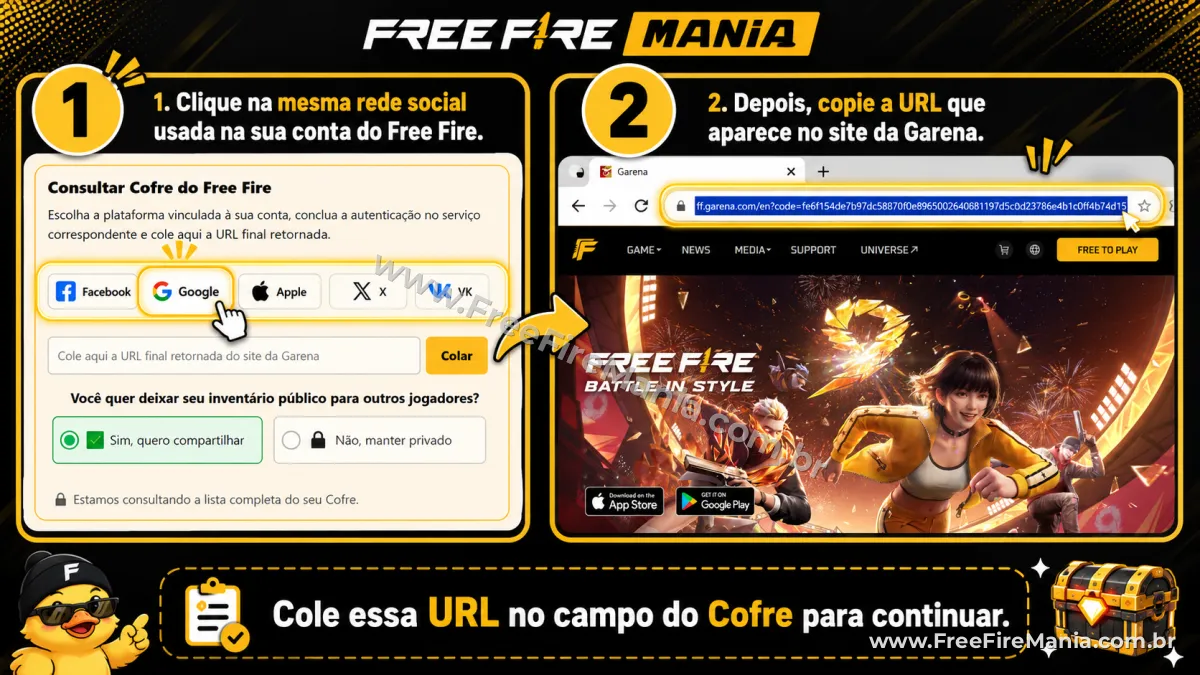
Use the tool below to check and save your Free Fire inventory on Free Fire Mania:
Sign in to check your Vault
The Vault shows the items found in your Free Fire inventory and saves the result to your Free Fire Mania account. To protect your data and control access to the tool, you need to sign in before starting the lookup.
Latest public Vaults
See the latest inventories that players chose to share publicly on Free Fire Mania:
- ΛKΛZΛ ☪︎ — ID 333539355 | 8.205 itens
- O ALEATÓRIO — ID 146161201 | 4.440 itens
- ꜱᴀɴᴛɪᴀɢᴏㅤㅤㅤ⸙ — ID 1271615889 | 3.419 itens
- 愛┇ ˢᵃᵏᵘʳᵃㅤʰᵃ — ID 16929815358 | 18 itens
- 发ɪᴄᴀʀᴏ — ID 93163924 | 1.929 itens
- GEOVANNAㅤ. — ID 513967021 | 4.031 itens
- ꧁TkHenry꧂ — ID 2091053425 | 1.423 itens
- anny ausen't — ID 215047199 | 2.071 itens
- ☞DⒶⓋⒾ✧RⓎⒶⓃ☜ — ID 3023061718 | 822 itens
- KAWANㅤ♿︎ㅤ — ID 46530297 | 4.860 itens
- kaio_gtk — ID 4469352832 | 536 itens
- ýago-elia — ID 5007104469 | 70 itens
- ꧁࿇PESADELO✞ — ID 2427683595 | 1.212 itens
- 乃ㅤCARRASCO — ID 2415841245 | 1.794 itens
- ㅤɢʋɪzɪɴㅤ — ID 8297115073 | 2.394 itens
- ㅤL7RAMOS亗 — ID 8351514918 | 2.123 itens
- 亗ㅤCØRINGΔㅤꚠ — ID 3118600485 | 1.772 itens
- RFᅠDANONE ꚠ — ID 7626676842 | 3.099 itens
- ㅤ nofaceᭂㅤ — ID 3899814358 | 1.622 itens
- ❀ NORDESTINO — ID 11186701224 | 911 itens
What is the Free Fire Vault?
The Free Fire Vault is a Free Fire Mania tool created to organize items found in a player inventory, such as skins, emotes, bundles, backpacks, crates, parachutes, weapons and other cosmetics. After authentication and lookup, the tool saves a compact item list and lets the collection be opened again by ID.
Rarities help identify each cosmetic classification. To see names, categories and details for items available in the game, visit the Free Fire items list.
Public or private Vault: what is the difference?
When checking the inventory, the player can choose whether to share the Vault with the community. If the Vault is public, other people can open the link and view the item collection associated with the ID. If it is private, the result is available only in the protected area of the logged-in Free Fire Mania user.
To change this setting later, just generate a new Free Fire Vault and choose again whether it will be public or private. The new setting replaces the previous visibility option.
Important: the Free Fire Vault stores only the information needed to identify and display the checked inventory, such as the player ID and item identifiers. No password or access token is stored by Free Fire Mania, and those credentials are never shown in public or private Vaults.
Frequently asked questions about the Free Fire Vault
Is it safe to use my Free Fire account token?
The authentication URL is used temporarily only to check your Vault items. Free Fire Mania does not ask for your password and does not store the access token.
After the lookup, the token is no longer needed for the tool. For safety, never share your password and use only the authentication from the platform services linked to your account.
What information becomes public when I share my Vault?
When the player makes the Vault public, other people can view the collection information associated with the ID, including the items found in the inventory. Passwords, access tokens and authentication credentials are not stored or displayed.
Can I update my Vault at any time?
No. To protect the server and avoid excessive lookups, each player can generate a new Vault versión only every 48 hours.
Does the Vault show every Free Fire item?
The Vault shows the items found in the checked account inventory. To keep the page fast, items are displayed gradually, but the saved inventory keeps the collection found during the last lookup.
Does the Vault replace the official Free Fire login?
No. Free Fire Mania does not replace the authentication system of the platform linked to the account. The tool only uses the lookup started by the player to organize inventory items. It does not sell, unlock or transfer items.
How do I see the items in my Free Fire account?
Sign in to Free Fire Mania, choose the platform linked to your account (Facebook, Google, Apple, X or VK), complete authentication, paste the final returned URL in the text box and click "Check my Vault".
Do I need to pay to use the Free Fire Vault?
No. Inventory lookup is free and available to any player logged into Free Fire Mania.
 Do you want to receive notifications about Free Fire?