Free Fire Sensitivity Generator by Device
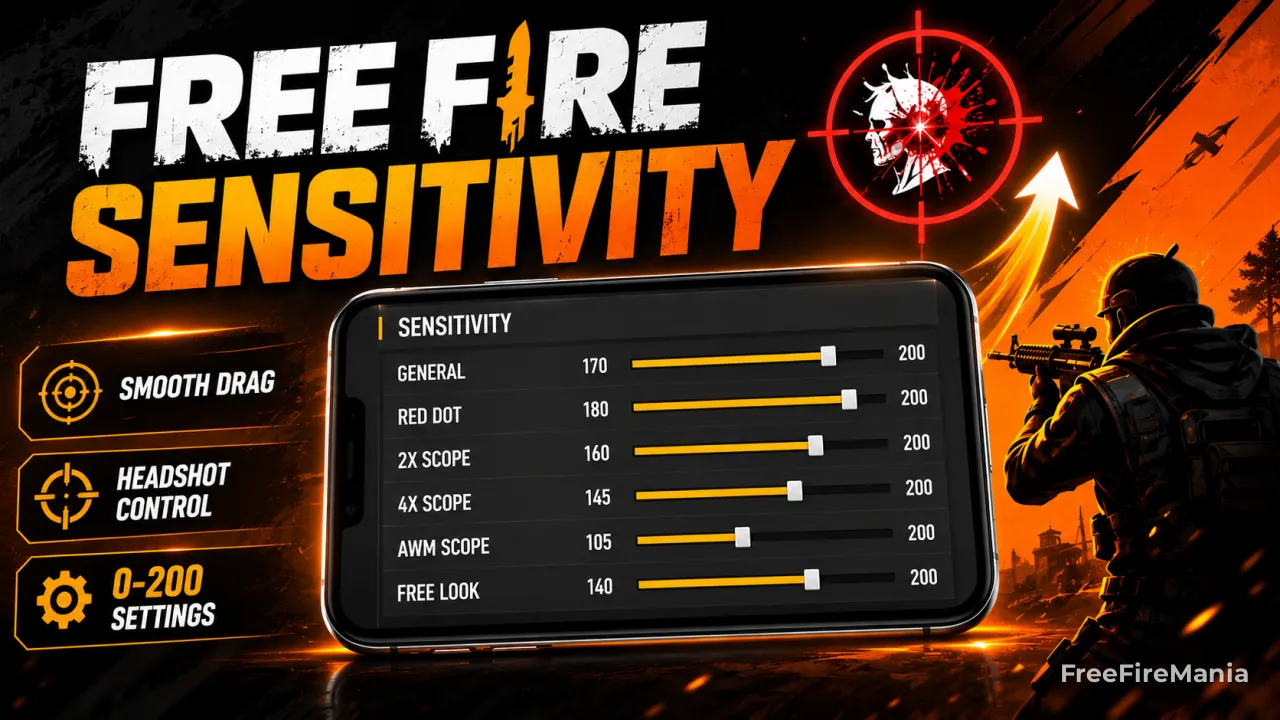
The Free Fire sensi generator calculates sensitivity by phone model, with or without DPI. It recommends General, Red Dot, 2x Scope, 4x Scope, AWM, Free Look and fire button size without installing APKs or modifying game files.
Generate Your Free Fire Sensitivity Now
Type your phone model below. The sensi generator will calculate values based on your device's DPI, optimized for headshot accuracy on the current 0-200 scale.
By
Ronny Rolim
Instead of using the same values as everyone else, this tool calculates sensitivity specifically for your device model and its real screen DPI. The result: a headshot-ready starting point that actually matches your hardware.
What Is a Free Fire Sensi Generator?
A Free Fire sensi generator - also called sensitivity generator, sensi calculator, or simply sensi generator FF - is a tool that calculates your ideal sensitivity settings based on your phone's hardware, specifically its screen DPI.
Most players search for "free fire sensitivity" and end up copying values that were created for a completely different device. A sensitivity built for an iPhone 15 Pro Max (460 DPI) will feel completely wrong on a Samsung Galaxy A05 (320 DPI) - and vice versa.
The generator solves this by doing the math automatically: you select your device, and it outputs values calibrated to your screen's real touch behavior.
| Method | Personalized? | Based on DPI? | Safe? | Current scale? |
|---|---|---|---|---|
| Sensi Generator (this tool) | Yes - by device model | Yes | Yes | Yes |
| Copying from YouTube | No - different device | Rarely | Yes | Varies |
| Third-party sensitivity apps | Warning: Generic presets | No | Warning: Risk of ban | Often outdated |
| Manual trial and error | Full control | Manual | Yes | Always |
How the Free Fire Sensitivity Generator Works
The generator cross-references your phone model against a database of 355+ devices, each with its real screen DPI value. DPI (dots per inch) is the key variable - it determines how much physical movement your finger needs to make to produce one unit of in-game rotation.
The core logic: lower DPI = higher sensitivity needed. A phone with 270 DPI (like many Samsung Galaxy A-series entry models) needs General sensitivity near 185-190 to compensate for the screen's lower touch resolution. A flagship phone at 550 DPI (like the Galaxy S24 Ultra) needs General around 140 - because the screen already registers micro-movements that a lower DPI phone would miss entirely.
Device age also factors in. Older phones with degraded touch panels respond less precisely, so the generator adjusts values slightly upward for devices over 2 years old.
Free Fire Sensitivity by Device DPI
Use this table to understand what sensitivity range your device falls into, or to manually set values if your phone isn't in the generator's database yet.
| DPI range | Device examples | General | Red Dot | 4x Scope | Sniper |
|---|---|---|---|---|---|
| < 300 | Infinix Hot, Itel, Tecno | 175 - 190 | 160 - 175 | 130 - 145 | 115 - 130 |
| 300 - 380 | Samsung Galaxy A05, A14, A15 | 185 - 200 | 170 - 185 | 140 - 155 | 125 - 140 |
| 390 - 449 | Redmi Note 12, Poco X5, Galaxy A54 | 168 - 182 | 153 - 167 | 123 - 137 | 108 - 122 |
| 450 - 519 | iPhone 14, iPhone 15, Galaxy S22/S23 | 155 - 172 | 140 - 157 | 110 - 127 | 95 - 112 |
| 520+ | Galaxy S24 Ultra, Xperia 1 | 140 - 152 | 125 - 137 | 95 - 107 | 80 - 92 |
Not sure about your device's DPI? Type your phone model into the generator above - it will identify the DPI automatically and calculate the right sensitivity range.
Sensi Generator FF - Headshot Focus
The most searched variation among competitive players is sensi generator FF headshot - a setup where the generator prioritizes Red Dot and 2x Scope values for close-to-mid-range headshot drag shots.
In this configuration, Red Dot sits slightly higher relative to General - creating the fast upward drag motion that pulls crosshairs to head level in close fights. This is the default headshot behavior the generator calculates for most devices.
Free Fire Sensitivity Calculator - Headshot Method
When used as a free fire sensitivity calculator headshot tool, the generator applies three core headshot principles to its output:
- Red Dot slightly lower than General - creates the drag-up motion for head-level hits
- 2x Scope at ~85% of Red Dot - keeps mid-range tracking smooth without overflick
- Free Look kept low (15-20) - prevents accidental camera rotation during intense fights
These ratios are maintained automatically by the generator across all device tiers, regardless of DPI. The absolute numbers change per device, but the headshot-optimized ratios remain consistent.
Sensi Generator for Free Fire Max
Players using Free Fire Max on high-end devices (typically 6GB+ RAM, 450+ DPI, 90Hz or 120Hz screens) should use the generator with their specific model - the same tool works for both Free Fire and Free Fire Max.
The key difference in Free Fire Max: the smoother frame rate makes sensitivity feel slightly faster than on standard Free Fire. If you're migrating from standard to Max, consider reducing General by 5-10 after generating your baseline.
Most Searched Phones for Sensitivity
Players are using the generator for these devices right now:
After Using the Sensi Generator - Next Steps
The generator gives you a calibrated starting point. Here's how to get the most out of it:
- Apply the values exactly as generated - don't change anything yet
- Go to training mode - shoot at stationary and moving targets for 10 minutes
- Test Red Dot drag specifically - aim at chest height and drag upward; adjust Red Dot +/-5 if you consistently over or undershoot the head
- Play 3 ranked matches before judging the setup - muscle memory adaptation takes time
- Adjust one value at a time - never reset everything at once
If you want to understand why these values work and how DPI affects everything, read the complete guide:
Guide: Want to understand sensitivity deeper?
Full breakdown of headshot values, DPI impact, and sensitivity by device tier - with tables for every RAM and DPI range.
DPI: Need to adjust DPI first?
Sensitivity and DPI multiply each other's effects. If your aim still feels off after generating, your DPI may need adjustment.
Read: Best DPI for Free Fire
Free Fire Sensi Generator - FAQ
Q: What is a Free Fire sensi generator?
A Free Fire sensi generator - also called sensitivity generator, sensi calculator, or FF sensi generator - is a tool that calculates recommended sensitivity values based on your specific phone model and screen DPI. Unlike generic presets, it produces values matched to your device's actual touch behavior.
Q: Is the sensi generator the same as a sensitivity calculator?
Yes. "Sensi generator", "sensitivity generator", "sensi calculator", "ff sensi generator", and "sensitivity calculator free fire" all refer to the same type of tool - one that calculates personalized sensitivity values based on device data. This tool does all of the above.
Q: Why does my device DPI affect sensitivity so much?
DPI determines how many touch points your screen detects per inch of movement. Lower DPI screens detect less movement - so without higher sensitivity values, small finger movements won't produce enough in-game rotation to reach the head. A Samsung Galaxy A05 (320 DPI) needs General around 185; a Galaxy S24 Ultra (550 DPI) only needs around 140 to achieve the same rotation speed.
Q: Does the sensi generator work for Free Fire Max?
Yes. The generator works for both Free Fire and Free Fire Max. If you play Free Fire Max on a high-end device with 90Hz or 120Hz refresh rate, consider reducing General by 5-10 after generating, as the smoother frame rate makes sensitivity feel slightly faster than on standard Free Fire.
Q: Does the generator use hacks or violate Free Fire rules?
No. The generator is a web-based calculator that never accesses your game account, installs software, or modifies any game files. It only suggests sensitivity values that you apply manually inside Free Fire's official settings menu. It is 100% compliant with Garena's terms of service.
Q: Can I use the generator after a Free Fire update?
Yes - and it's recommended. After major Free Fire updates, in-game sensitivity behavior can shift due to engine or physics changes. Re-running the generator gives you a fresh calibrated baseline to start fine-tuning from, instead of fighting an already unstable setup.
Q: My phone isn't in the list - what do I do?
If your phone isn't in the generator's database, use the DPI reference table above to find your device's DPI range and apply the corresponding values manually. You can usually find your device's DPI by searching "[your phone model] screen DPI" online, or in the phone's official specs page.
SHARE:
 Do you want to receive notifications about Free Fire?