Free Fire OB53 Update (April 8, 2026): Full Patch Notes, Nerfs, Buffs and New Features
The Free Fire OB53 update arrives on April 8, 2026. Check full patch notes, nerfs, buffs, new character Ray, weapon changes and gameplay updates.
By
Ronny Rolim
The next major update of Free Fire is officially scheduled to arrive on April 8, 2026, bringing the highly anticipated OB53 version. This update introduces a wide range of new features, gameplay adjustments, character balance changes, and system improvements that promise to reshape both casual and competitive matches.
From the brand-new Undersea-themed mechanics in Battle Royale and Clash Squad to major weapon balancing and character updates, OB53 is set to deliver one of the most impactful patches of the year. Below, you can check out the full patch notes with all confirmed changes and additions.
This information is exclusive to Free Fire Mania. Although Garena has not officially released the OB53 patch notes yet, our team has gained early access to the update documents. As a result, all details shared here are based on verified internal sources, making this one of the first and most complete previews of the upcoming Free Fire update.
Patch Notes
Battle Royale
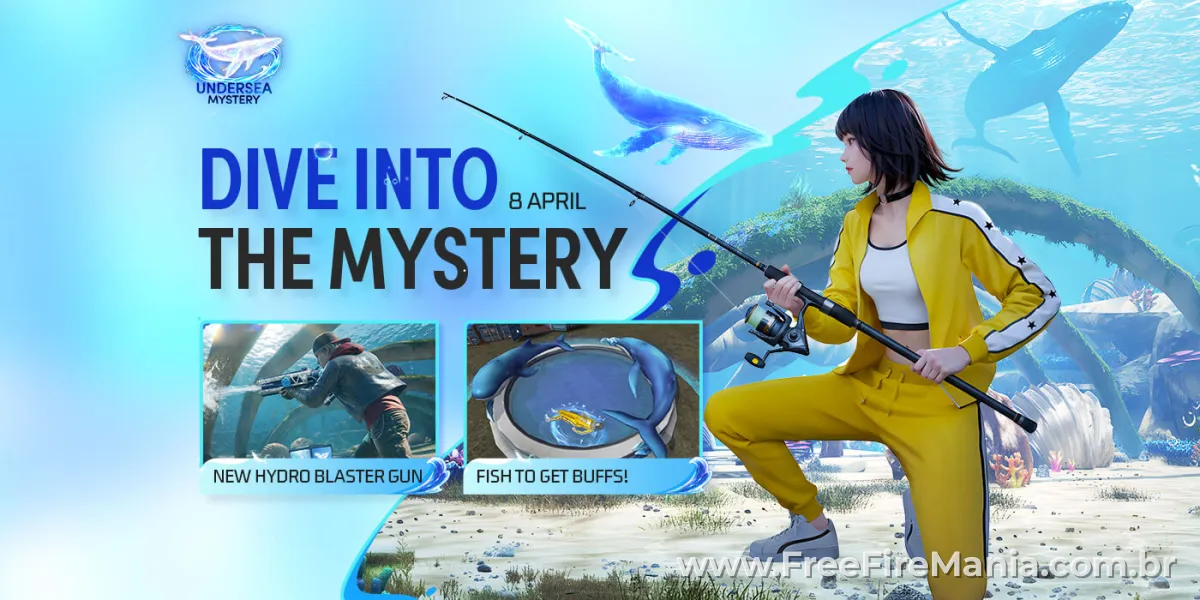
Undersea Mystery
The water’s ready and the blue whale has set sail. Fishing Ponds, Bubble Airdrops, and Hydro Blasters await in the waves!
“Take a break from the intense BR action to fish for supplies and buffs! Team up to capture Bubble Airdrops and claim the powerful items inside. Dive in with friends and dominate the world of water!”
- Whale Plane
- The plane at the start of each match is now modeled as a whale, giving every match a fresh visual start.
- Undersea Realm
- The entrance to the realm will appear in Nurek Dam, Bermuda.
- The realm offers richer resources and an interactive sword statue that yields high‑tier loot.
- Players can use portals to return to the surface.
- Hydro Zone
- During the event, the High-tier Loot Zone becomes the Hydro Zone, surrounded by giant water walls.
- Players will not take any damage or be slowed while passing through the wall. Bullets may travel through the wall, too.
- Like the High-tier Loot Zone, the Hydro Zone may contain high‑tier loot.
- Fishing Pond
- Fishing Ponds spawn across the map. Interact to catch fish or get loot.
- Fish grant different buffs and will follow the catcher.
- If you eliminate an enemy, their fish will follow you instead.
- Random ponds will upgrade to elite Fishing Ponds at the start of a match with richer loot.
- Bubble Airdrop
- Giant whales periodically appear in the sky and drop Bubble Airdrops.
- Capture a Bubble Airdrop to claim various powerful loot.
- Pop and charge the bubbles around the airdrop with your teammates to speed up the process.
- Hydro Blaster
- Hold fire to continuously spray water beams toward your crosshair. After sustained fire, the Hydro Blaster triggers a high‑pressure burst that deals heavy damage.
- When the Hydro Blaster runs out of ammo or during manual reload, a QTE enables a fast reload.
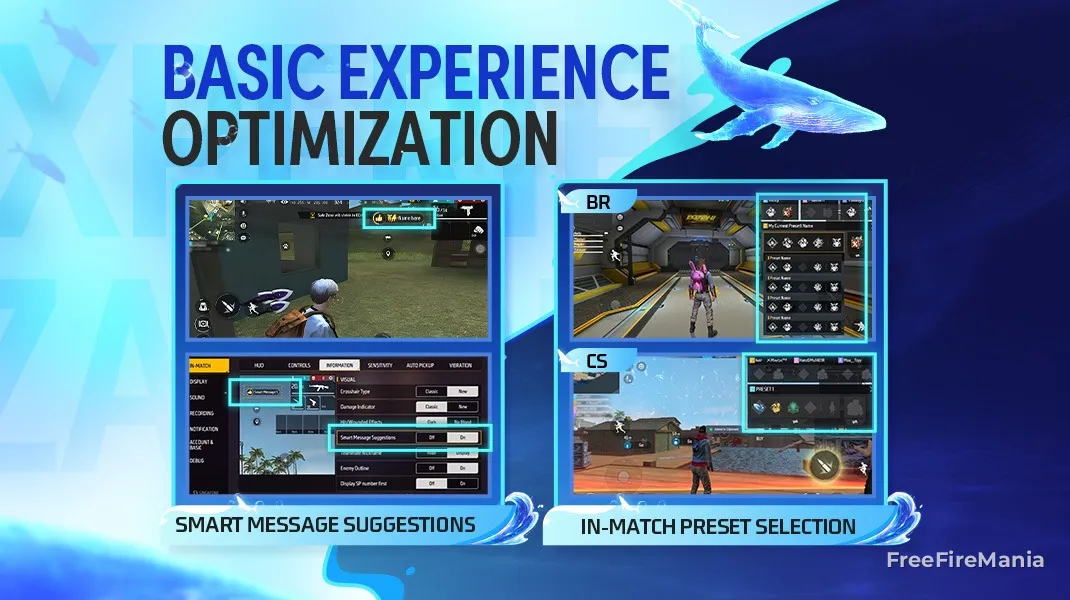
In-Match Preset Selection
Flexible in‑match builds
"Choosing the right preset before the match is key to Booyah."
- Players can switch Presets and Loadouts during the preparation phase after entering a BR/CS match.
- Once the match begins, you can select from Preset 1-5 and change your Loadout, but you cannot change specific active or passive skills.
- Using a Loadout locks Preset editing for the remainder of the match.
- The Preset selection page opens automatically at match start for players ranked Heroic and above.
Quick Messages Update
Faster communication, better teamwork
"Strike! Retreat! Hold position! Tactical calls are the backbone of teamwork on a fast-moving battlefield. But during intense fights, juggling controls and callouts breaks your rhythm and costs opportunities. This patch adds an enhanced quick-message system so teams can share critical info instantly, letting players stay focused on execution and the moments that decide the match.”
- Added a Group Up icon to quickly call teammates to your location.
- New auto quick messages trigger when:
- You hit an enemy, and their location is auto-marked.
- You are attacked by nearby enemies, and their location is auto-marked.
- You use a Bonfire / Super Bonfire / Bolt Maker / Smoke Grenade / Horizaline.
- You select a team buff or deploy the Helper Bot.
- New Smart Message Suggestions:
- Notifies teammates when you are capturing the arsenal, an airdrop, or a Revival Point.
- Reminds teammates if you have landed but haven’t picked up a main weapon.
- Alerts teammates when you pick up a main weapon on landing while they’re in combat.
- Improved marking feedback:
- Marking an enemy now shows the distance to the marked target.
- If you mark a location inside the Safe Zone while you’re outside it, the team receives a prompt to move into the Safe Zone.
Other Adjustments
- Most devices are now single‑use, except Launch Pads, Portals, and Mini Turrets.
- Mini Turret buff:
- Rate of Fire: 1s → 0.5s.
- DMG per shot: 50 → 25.
- Duration: 120s → 240s.
- Firing Distance: 60m → 100m.
- Tactical Market (loadout) changes:
- Removed Hit List and Arsenal Key.
- Monster Truck Drop can only be purchased within the first 600s of the match.
- Dinoculars price: 200 → 100 FF Coins.
- Launch Pads changed to unlimited use; price increased to 1400 FF Coins.
- Removed active skill cards.
- UAV‑Lite is now single‑use and has purple rarity; purchase limit 2.
- Added Heal UAV-Lite; purchase limit 2.
- Inhaler carry limit adjusted to 10.
- Launch Pad cooldown increased: 240s → 300s.
- Med Kits from Coin Machines: 2 → 1.
- Capture speed bonus from breaking the pillars around an Ultra Airdrop: 10% → 3%.
- Arsenal upgrade price: Solo, 1200 → 800 FF Coins; Duo, 1200 → 1000 FF Coins.
- Reduced ground spawn rates for UAV-Lite, Heal UAV-Lite, and Gloo UAV-Lite.
- Optimized Lightning Zone and Out-of-Zone sound effects.
- Adjusted some High-tier Loot Zone spawn areas.
- Significantly lowered the volume of other players inside the plane cabin.
- Updated interactive FFWS stickers across maps.
- Loot boxes in deep water now float to the surface so they can be looted normally.
Clash Squad
Undersea Mystery
Fight with Hydro Blasters in the Undersea Realm
“The Undersea Realm joins the Bermuda rotation and extends the battlefield to the ocean floor! Hydro Blasters are now also available in the CS Store. Same firepower, more splash for a fresh combat experience.”
- Added the Undersea Realm to the Bermuda map pool.
- Added Hydro Blasters to the CS Store.
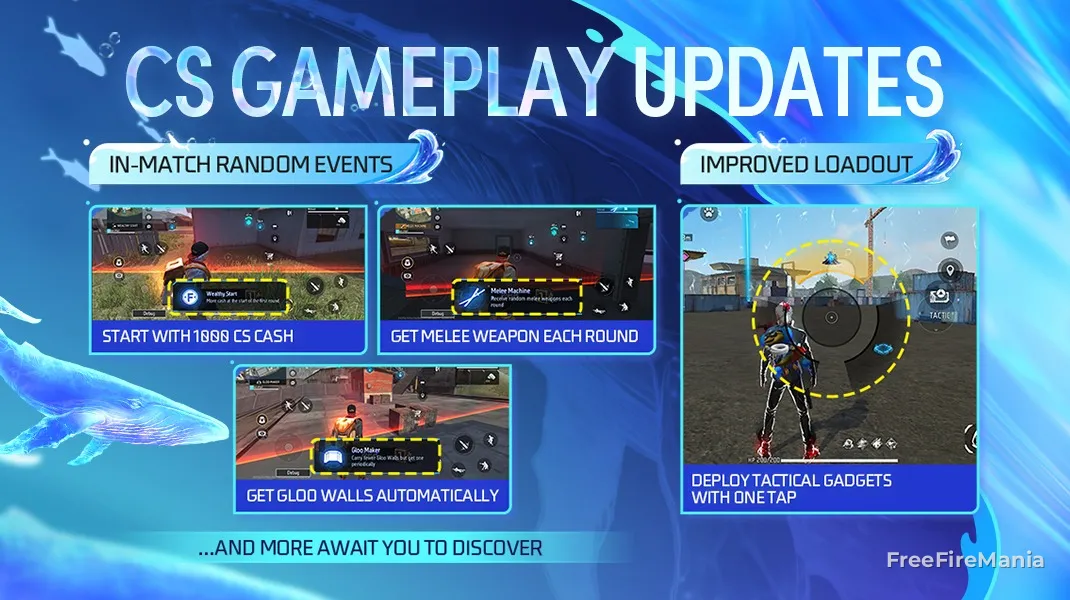
CS Random Events
Ever imagined Clash Squad with melee weapons only, auto Gloo Walls, or carrying over your last round’s weapon? The new CS random events make it happen!
“Random Events are coming to Clash Squad, making every match more varied and pushing players to adapt their tactics for a fresh experience.”
Random Events details:
- Start each CS match with 1000 CS Cash.
- Get Super Meds instead of Med Kits at the start of each round.
- Get Super Energizers instead of Med Kits at the start of each round.
- Get a Gloo Wall every 5s.
- Get a Lv. 2 Helmet and a Lv. 2 Vest at the start of each round.
- Get a random melee weapon at the start of each round.
- If a player was eliminated in the last round, they will receive the main weapon they held at the end of that round’s preparation phase at the start of the next round.
CS Loadout and Minimap Optimization
Optimized Tactical Market for smoother pre-match and in-match loadout usage.
“Gadgets in the Tactical Market can now be deployed at any time, and the Bermuda minimap has been enhanced to better support loadout deployment and battlefield assessment.”
- Added an in-match Tactical Market button during the battle phase. Tap to deploy the default or last-used gadget at your current location, or hold to open the selection wheel and drag to the chosen gadget to deploy it immediately.
- Tactical Market can be used while moving.
- Gadgets' effective durations will now start after the preparation phase.
- Optimized the Bermuda minimap for improved visuals and clearer layout.
- Additionally, scanning in CS has been overly powerful, and Tactical Market UAV‑Lites further exposed player positions and reduced tactical uncertainty. In response, UAV‑Lites are being removed from the Tactical Market and Jammer devices are being added as an anti-scan option.
Characters
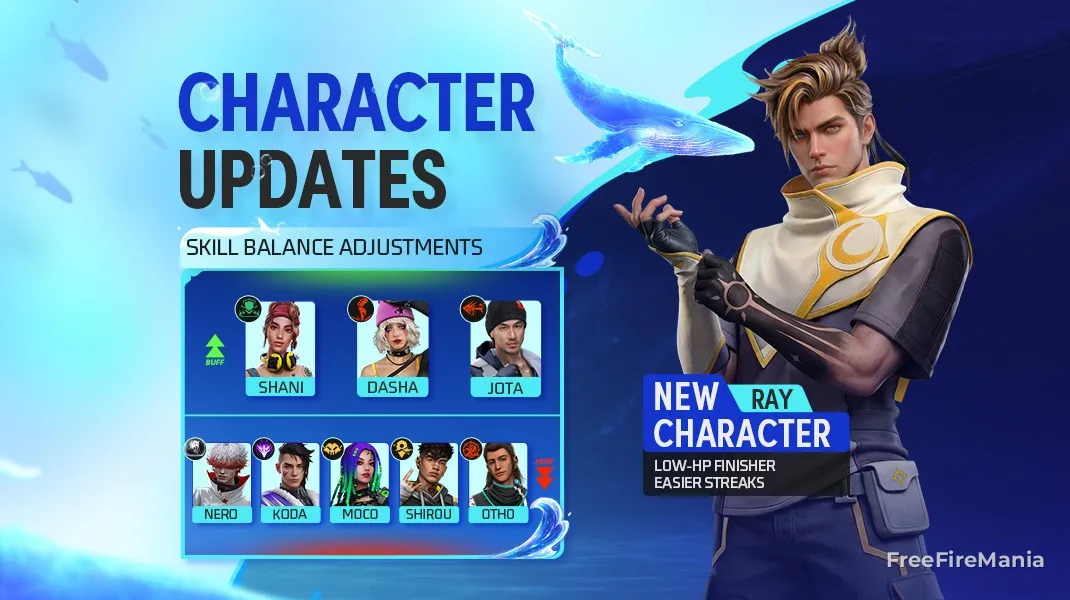
New Character Ray
The Watchman
Tired of endless fighting, Ray left the gang with help from Shirou’s father. He now wanders the hidden corners of cities, using his strength to protect the weak.
For rushers who enjoy elimination streaks, Ray is a must-try. His Sunpower links to and tags enemies, and can instantly knock down tagged foes when they’re at low HP—no more last‑second escapes. Knocking down a tagged enemy immediately resets the skill cooldown and restores Ray’s HP, keeping him ready for the next fight. Try pairing him up with characters like Jota, Dasha, and Shani, and you may be surprised!
Bond of Eclipse
Releases the sunpower forward in a 30m fan-shaped range to tag the first undowned enemy hit for 10s and creates a link with them (visible in 40m to only the skill user and their tagged enemy). If the user reduces the tagged enemy's HP to 40 or below, the enemy is knocked down instantly. If the enemy is knocked down or eliminated while tagged, moonpower will reset the skill and restore the user's HP by 10/s for 3s in total. Cooldown: 45s.
Skill Balance Adjustments
Elimination-Streak-Related Skills (Buffed)
Landing consecutive takedowns feels great. However, skills related to elimination streaks have overly strict triggers that could break momentum, so they have been buffed this patch to activate more easily. Keep the pressure on and enjoy non-stop action!
Dasha
Dasha’s short skill window often made chaining targets after a knockdown difficult, limiting her versatility. This patch extends her skill duration to improve follow-up potential.
Partying On
After knocking down an enemy, enter Highlight mode, which increases rate of fire by 18% and movement speed by 12% but then decays quickly. Lasts for 6 →10s. During Highlight mode, consecutively knocking down enemies will reset countdown and further boost rate of fire by 4% and movement speed by 3%.
Shani
Shani’s skill duration was also a bit too short, limiting follow-up options. This patch increases her skill duration to improve her follow-up potential.
Gear Recycle
When using an active skill, gives 30 Shield Points to self and teammates within 10m. The Shield Points decay after 5 → 10s, after which players can obtain the effects again. Cooldown: 10s.
Jota
Previously, Jota’s HP recovery required knockdowns scored with guns. To increase his versatility, any type of knockdown now triggers his HP recovery, making him more effective across a wider range of combat situations.
Sustained Raids
Hitting an enemy with guns will restore some HP, while knocking down an enemy in any way will recover 20% HP.
Information-Related Skills (Nerfed)
Information skills that reveal enemy positions, such as Koda and other mark skills, have become too powerful and make tracking opponents too easy. To restore high-stakes gunplay, these skills are being toned down across the board.
Koda
Aurora Vision
Activates the Aurora power for 10 → 8s. Increases movement speed by 15% and discovers enemies behind cover within 50m every 1s (unable to detect those crouching or prone). Cooldown: 45s.
(While parachuting, highlights enemy locations within the field of view but the effect is not shared with teammates.)
Moco
Enigma’s Eye
Marks the enemy hit, exposes their location in the field of view, the minimap, and shares it with teammates for 4 → 3s. The enemy, if moving while marked, will have their location exposed for a longer time, up to 5.5 → 4s.
Otho
Memory Mist
After knocking down an enemy, marks their teammates within 20m from them and slows down their movement speed by 25%. Lasts for 4 → 3s. When knocked down by a nearby enemy, marks and slows down the attacker and their teammates.
Shirou
Damage Delivered
When hit by an enemy from within 100m, said attacker is marked for 10 → 8s (intel is shared with teammates). Max. 4 markings.
Nero (Nerfed)
Nero was designed to provide strong control to restrain enemies while still allowing counterplay, such as destroying his plushie. However, alongside his Gloo Wall control, Nero currently deals substantial damage, leaving opponents at a severe disadvantage even when they react quickly after being hit. Therefore, his damage and wall-blocking control are reduced to restore balance.
Cryo Mind
Throws a 150-HP plushie. The plushie lasts for 12s, ignores obstacles and can fly up to 50m (100m in BR). The plushie will track the nearest enemy in sight within 8m range and explode to create an 8m-radius dreamy space. Inside the space, the user and their enemies cannot place Gloo Walls. Their enemies also lose 16 → 14 HPs. The space disappears once the plushie is destroyed. The destroyer will be marked for 5s. Cooldown: 45s.
*After leaving Nero’s dreamy space, players can start placing Gloo Walls more quickly with less delay.
Weapon and Balance
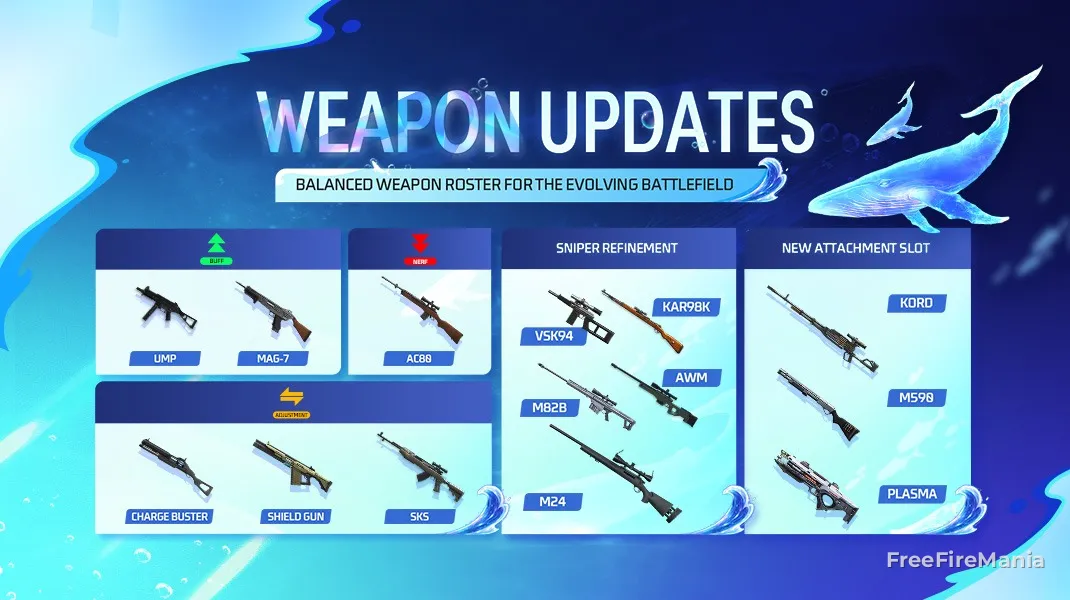
Limb Damage Adjustment
The limb damage multiplier makes damage feel inconsistent. During aim‑locking, whether a shot registers on a limb or the body often feels random, which renders the multiplier meaningless and confuses players. To make damage more predictable, limb damage scaling is removed. Limb hits now deal the same damage as body shots, and armor protection applies to limbs as well.
- Removed limb DMG multiplier; limb hits deal the same damage as body shots.
- Armor now covers limbs by default.
Weapon Attachments: M590/PLASMA/Kord
To give all weapons some room to grow with attachment slots, we are adding those slots for the following guns.
- M590 (Adjustment): Added Foregrip and Stock slots (cannot equip Silencer).
- PLASMA (Adjustment): Added Foregrip and Stock slots.
- Kord (Adjustment): Added the Muzzle slot.
Marksman Rifles: AC80/SKS
The AC80 has been outperforming its peers and dominating the marksman rifle roster. To improve balance across the class, the AC80 will receive a slight nerf and the SKS will be buffed.
- AC80 (Nerf): Damage -6%, Extra Damage to Shield Points 20% → 0%.
- SKS (Adjustment): Rate of Fire +6%, Range +15%, Reload Speed +10%, Magazine Capacity 16 → 10.
Underused Weapons: Shield Gun/Charge Buster
The Shield Gun and Charge Buster currently underperform in pick and win rates due to their power and mechanics. This patch delivers major adjustments to both weapons to boost viability and make them compelling, competitive choices.
- Shield Gun (Adjustment): Rate of Fire +30%, Accuracy -10%, Movement Speed -8%, Reload Speed -40%, Magazine Capacity 30 → 25.
- Charge Buster (Adjustment): Pellet Count 8 → 7, added the Foregrip slot, Movement Speed +6%, Limb Damage +25%.
Sniper Rifles: M24/AWM/AWM-Y/VSK94/M82B/Kar98k
Following the limb damage multiplier change, sniper rifles now deal the same damage to limbs and body, and damage will scale more with armor level. To better suit current combat, selected sniper rifles will receive overall adjustments. The previously overlooked M24 is getting a major rework: it is now upgradable and should be a viable choice from early to late game.
- M24 (Buff): Now upgradeable.
- M24: Damage +60%, Reload Speed -25%, Movement Speed -20%, Magazine Capacity 15 → 5, Headshot Rate 5.5 → 2.5, can no longer penetrate Gloo Walls.
- M24-I: Rate of Fire +4%, Armor Penetration +20%.
- M24-II: Rate of Fire +4%, Armor Penetration +20%.
- M24-III: Rate of Fire +4%, Armor Penetration +20%.
- AWM/AWM-Y (Buff): Armor Penetration +20%, Limb Damage +50%.
- M82B (Buff): Armor Penetration +20%, Limb Damage +50%.
- VSK94 (Buff): Armor Penetration +20%, Limb Damage +50%.
- Kar98k (Buff): Armor Penetration +20%, Limb Damage +50%.
Other Balance Adjustments: MAG-7/UMP
The MAG-7 and UMP are easy-to-use close-range weapons that haven’t been adjusted in a while. Meta shifts have left them behind, so both receive small buffs to help them stay competitive in close-quarters fights.
- MAG-7 (Buff): Weapon Switch Speed +15%, Rate of Fire +5%, Movement Speed +5%.
- UMP (Buff): Range +5%, added the Muzzle slot.
Weapon Source Adjustments
- Battle Royale:
- Vending Machine Adjustments:
- M24-II: Priced at 600 FF Coins with a purchase limit of 5 per match.
- M1014-II: Priced at 600 FF Coins with a purchase limit of 5 per match.
- VSS: Priced at 100 FF Coins with no purchase limit.
- Others:
- Shield Gun: Now available as ground loot in Solara as well (previously only available as ground loot in NeXTerra).
- Vending Machine Adjustments:
- Clash Squad:
- FAMAS: Priced at 1800 → 1600 CS Cash.
- M1014-III: Available in Cyber Items for 1900 CS Cash.
- Winchester-III: Available in Cyber Items for 1900 CS Cash.
Other Gameplay Adjustments
- Using Med Kits/Super Meds while sprinting will stop the sprint and begin healing.
- Long item names no longer shrink to fit; instead, names will scroll to display fully.
- In the final round of Lone Wolf matches, players who have not chosen a weapon will receive a randomly assigned gun.
- Polished the UI for certain effects, including the compass and persistent state displays, like sprinting and crouching.
- Optimized display for the Helper Bot buff.
- Optimized progress display when helping up downed teammates.
System
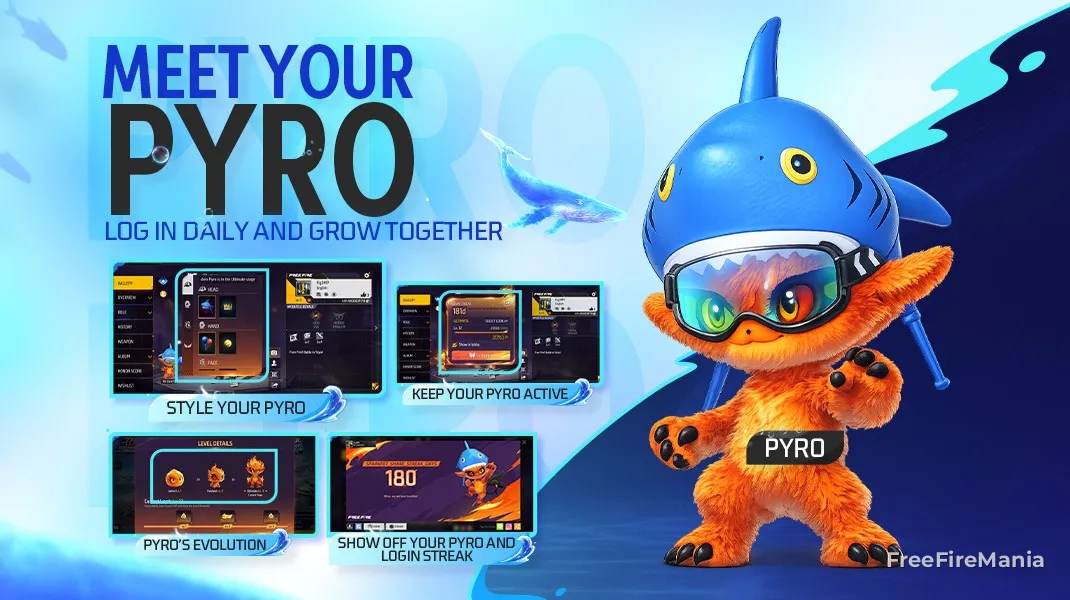
Login Streak System: Pyro
Stay active and grow with your Pyro!
"The Login Streak system is now live! Log in daily to level up Pyro, your personal fiery companion, and unlock stylish outfits for them. Don’t forget to log in and hang out with Pyro, or their flames may grow dim or even go out.”
- A new login streak system introduces Pyro, a companion that gains EXP from the player’s daily logins and can evolve up to 3 stages.
- Pyro appears on the player’s profile page and in the lobby, and can be dragged around or hidden.
- At the Ultimate stage, Pyro’s Vault is unlocked and grants various Pyro cosmetics.
- Missing a day causes Pyro to become faded; extended inactivity puts Pyro into an inactive state.
- Players can switch between any unlocked Pyro looks at any time.
- Players receive a push notification one day before Pyro is about to fade or go inactive.
HUD System Optimization
More ways to share and smarter adjustments
“HUD customization is key to a personal play experience. To make sharing and quick tweaks easier, several improvements have been added.”
- Added new HUD sharing options. Now players can share their HUD on social media, with their in-game friends, or via a link and QR code.
- Added the new Smart Adjust feature, which suggests HUD adjustments by analyzing screen tap data and HUD usage patterns.
Team Invite on Match Result Page
Best teammate ever? Let’s go again!
“Just finished a match and want more? Invite teammates, or even opponents, to jump into another match directly from the match result screen.”
- Battle Royale: Invite teammates from this match to join your team.
- Clash Squad: Tap the team-up button at the top‑right of the scoreboard on the match result screen to invite teammates or opponents.
- If a player accepts your invitation, their post‑match progress becomes viewable.
Search Nearby Players
Find nearby players!
“Tap ‘Search Nearby’ on the Add Friends page to discover nearby players.”
- The system recommends up to 5 nearby non-friends who meet the level requirement. View profiles, send friend requests, invite them to team up, or refresh for more results.
- Players can disable this feature if they do not wish to be discoverable.
Social Media Info Display
Build your personalized profile and let the world follow you!
“Personal profiles are the best place to show off style and connect with others. To encourage in‑game self-expression, a new social media display feature has been added to personal profiles.”
- Players can now link and display popular social media accounts, including Facebook, TikTok, and YouTube, directly on their profiles. Choose which links to share and build a unique profile!
Ban & Pick in CS Custom Room
Play like a pro in esports-styled matches
“An esports preset is added to CS custom rooms. Enable it to turn on Ban & Pick and other esports rules.”
- The Esports preset will have 11 rounds, with Cyber Airdrops and the Ban & Pick feature enabled by default. The economy is also set to align with esports matches. The minimum level required to join the room has been changed to Lv. 10.
- A new Ban & Pick option is available in custom room settings.
- When Skill Ban & Pick is enabled, an extra Ban/Pick phase runs before the match. Player 1 bans active skills, and the remaining players pick from the remaining active skills. Active skill selections must be unique; no duplicates allowed. After skills are chosen, players can adjust their Presets to match their selected active skill.
- The Ban & Pick phase supports room spectating, as well as team text and voice chat.
Frame Rate Enhancement
Smoother Graphics, Sharper Controls
“The new Frame Rate Enhancement feature will take your gaming experience to the next level! You can enjoy the game with unparalleled smoothness and a refreshed gameplay experience.”
- Added an Experimental Frame Rate Boost option in High FPS Mode, which provides an additional frame rate boost when enabled.
New Camera Filters
Create epic shots with Cyberpunk & Golden Era filters
“Want to style up your gaming videos? With a sprinkle of “filter magic”, you can redefine your video’s visuals with two super-trendy styles. What are you waiting for? Time to shoot your own blockbuster!”
- Cyberpunk Filter
- A fan of the futuristic mech vibe? Try this one! The high-contrast blue-purple neon color tones give your videos an instant techy touch.
- Golden Era Filter
- Don’t just win — win in style! This filter bathes the whole scene in a golden sunset glow, and every frame looks like a wallpaper-worthy shot.
Other Adjustments
- Quick Messages now support displaying players' recent highlights, so you can show off your impressive stats to teammates before the match starts!
- The booking system is revamped! When you send a booking request to a friend, accepting it will immediately add them to your team. Once their current match ends, they will automatically return to your lobby to ready up and jump into the next match with you. You’ll never miss a friend’s team-up invite again!
- The system now recommends friends to new players whose friend list is empty or too short.
- Added in-match text chat and speech-to-text conversion via Quick Messages. Players can type messages or convert speech to text. These features are available only to players with an Excellent behavior rating.
- Improved the team-invite button on Veteran Return and Dynamic Duo Online pop-ups.
- CS custom rooms can now set the map area for each round.
- BR custom rooms now offer jump timing suggestions.
- Fixed a bug in which the USP-2 lacked weapon mastery.
- To limit max. movement speed, the following restrictions have been added:
- While the skill is active, players using Alok's skill will no longer benefit from the effects of their teammates' Alok skill auras.
- Reduced the speed boost’s effect for Team Booster in CS from 20% to 12%.
- Reduced the speed boost provided by the Tactical Market’s Super Bonfire in CS from 10% to 5%. Once players leave the bonfire area, the speed boost and rate-of-fire boost will now dissipate more quickly.
Craftland
Platform
1. Map recommendation is upgraded to suggest better maps based on preferences and play habits.
2. The new map recommendations for new players now feature top maps and will suggest maps based on your preferences.
3. Craftland maps now support chat, friend list, and player detailed info checking.
Scene Editting
1. Faster object loading when entering the editor.
2. When selected, the objects are now highlighted with a gold outline for clearer feedback.
3. New horse vehicle type added.
4. Objects can now hide their appearances.
5. Collision component now supports viewing the collision shapes.
Asset Store
Asset Store now supports downloading and sharing block scripts and UI templates.
Autosave Feature
1. Added autosave feature for player component custom attributes to save data to the next match. Supports basic types and lists, such as integer lists. A single attribute save limit is 4KB. If the data length is too long, it may lead to data loss.
2. Creator Center supports viewing and editing autosaved data. Please edit it after the player is offline, or changes will not take effect.
Others
1. Craftland Studio layout adjusted to separate local drafts and published/online maps.
2. Project file limit increased. Local drafts have no limit.
Explore to discover other new features and stay tuned for more coming soon!

 Do you want to receive notifications about Free Fire?